In a nutshell: A crypto price alert is a notification that tells you when a coin reaches a price you picked. On Coinbase you set one in the mobile app: add the coin to your watchlist, tap the bell icon with a plus sign, choose “above” or “below,” enter a price and save. Kraken and TradingView offer alerts too. An alert only tells you the price moved; it never buys or sells anything for you. Educational only; not financial advice.
Last updated: October 22, 2026.
Crypto trades 24 hours a day, seven days a week, so nobody can watch the price all the time. Coinbase price alerts and similar tools on other platforms do the watching for you and send a notification when a coin crosses a level you care about.
This guide shows how to set up price alerts on Coinbase step by step, how alerts work on Kraken and TradingView, how to choose sensible alert levels, and the mistakes to avoid.
Table of contents
What Is a Crypto Price Alert?
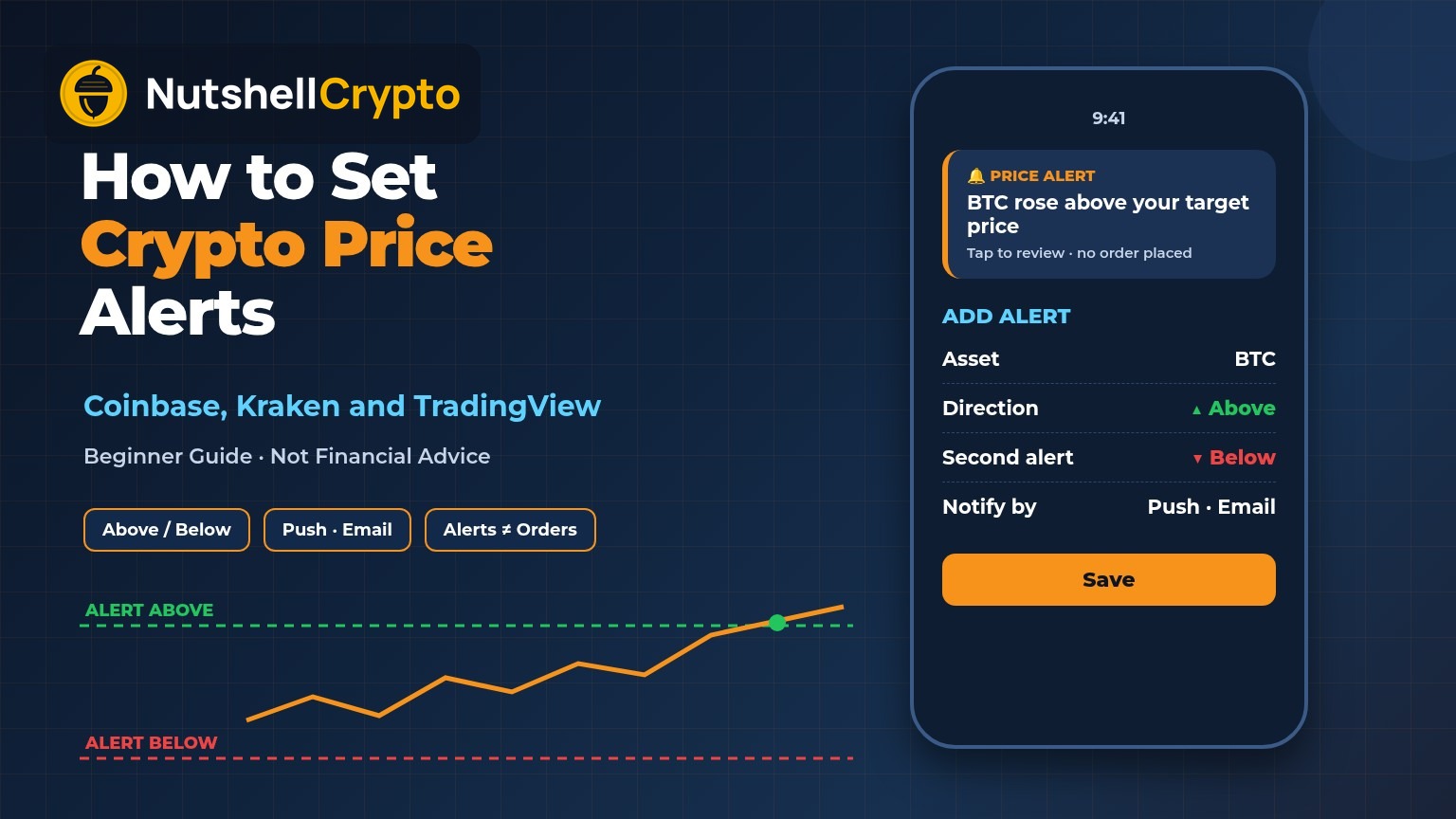
A price alert is a rule like “tell me if Bitcoin goes above $X” or “tell me if Ether falls below $Y.” The app or exchange checks the market price, and when your condition is met it sends a push notification, an email or an in-app message.
Alerts are useful for three everyday jobs:
- Not missing a move while you sleep or work, without checking charts every hour.
- Sticking to a plan. If you decided in advance to look at buying more at a certain price, an alert reminds you when that moment comes.
- Staying calm. Fewer price checks usually means fewer emotional decisions.
The key point: an alert is information, not an action. Coinbase’s own price alerts help page says alerts are only notifications that an asset has reached a certain price, and that they do not place an order.
How to Set Coinbase Price Alerts (Step by Step)
According to Coinbase’s help center, custom price alerts are set in the Coinbase mobile app:
- Open the Coinbase app and search for the crypto (or stock) you want to track, then open its page.
- Tap the star icon to add it to your watchlist. Coinbase notes that only assets on a watchlist send price alerts.
- Tap the bell icon with a + sign.
- Select Add Alert.
- Choose the direction, above or below, and type your target price.
- Tap Save.
Coinbase also offers predetermined price alerts. These are not tied to a price you type; instead the app tells you when a watchlist coin makes a large move. When Coinbase launched real-time price alerts, it described them as alerts for watchlist coins that show the percentage change when prices shift substantially up or down.
Menus can move around between app versions. If you can’t find the bell icon, update the app and look on the coin’s own page, next to the star.
How to Receive, Change or Turn Off Coinbase Alerts
Setting an alert is only half the job. If notifications are switched off, you won’t see it. Coinbase’s help page lists these steps in the mobile app:
- Open the menu and select Account & Settings.
- Select Notification Settings.
- For automatic move alerts, choose Price Alerts and pick an alert frequency from the dropdown.
- For alerts you set yourself, choose Custom Alerts.
- Switch on push, in-app and/or email notifications.
To delete a custom alert, go back to Notification Settings, open Price Alerts or Custom Alerts, pick the asset, tap the three dots next to the alert and choose Delete.
Also check your phone’s own settings. If your phone blocks notifications from the Coinbase app, no alert will reach you, however the app is set up.
Price Alerts on Kraken
If you use Kraken, its advanced platform has alerts as well. Kraken’s market alerts guide explains that on Kraken Pro web you add the Alerts widget, allow browser notifications, then create an alert by choosing the market, the trigger and the price level. On the mobile app you turn on push notifications, tap the bell icon on the Markets page and create the alert there.
Kraken says alerts set in Kraken Desktop sync across Kraken Pro and its mobile apps. It also offers volatility alerts for unusually large moves. One limit it mentions: futures price alerts can’t currently be created in the app, only on the web.
Price Alerts on TradingView
Many people track prices on a charting site instead of an exchange. TradingView’s introduction to alerts says a price alert can trigger when a symbol reaches a level, or rises above or falls below it. It can notify you through the mobile app, a browser pop-up, email, a sound, a plain text message or a webhook.
Two practical limits are worth knowing:
- Alert count. TradingView’s pricing page (checked October 22, 2026) lists 3 active price alerts on the free Basic plan, with higher limits on paid plans.
- Expiry. TradingView says a standard alert lasts at most two months before it stops automatically. Only its top plans offer alerts with no end date. Check your alerts list now and then so an important one doesn’t quietly expire.
Types of Crypto Alerts
| Alert type | What it watches | Example |
|---|---|---|
| Price level | A fixed price above or below the current one | Notify me if BTC rises above a level I chose |
| Percentage move | A large rise or fall over a period | Coinbase’s automatic alerts for big watchlist moves |
| Volatility | Unusually fast price swings | Kraken Pro volatility alerts |
| Technical | An indicator, trendline or drawing on a chart | TradingView alert when price crosses a moving average |
| Watchlist | One rule applied to many coins | TradingView watchlist alerts (paid plans) |
For most beginners, a few plain price-level alerts are plenty.
How to Choose Useful Alert Levels
An alert is only as good as the level behind it. A few simple approaches:
- Use round numbers sparingly. Prices often hover around round numbers, which can set off the same alert again and again. Setting the level slightly beyond the round number cuts the noise.
- Use levels from the chart. Recent highs and lows, often called support and resistance, are natural places for alerts. Our guide on how to read crypto charts explains how to spot them.
- Use percentage distances. An alert 10% above and 10% below today’s price tells you when something meaningful has happened, without reacting to normal daily swings.
- Tie each alert to a plan. Before you save it, write down what you will do when it fires: review your position, read the news, or do nothing. An alert without a plan just adds stress.
- Keep the list short. Five well-chosen alerts beat fifty that you start to ignore.
If you buy on a schedule, for example with dollar-cost averaging in crypto, you may need very few alerts at all, because your plan does not depend on hitting exact prices.
Alerts vs Limit and Stop Orders
People often mix up alerts and orders. The difference matters:
- A price alert sends a notification. Nothing is bought or sold. You decide what to do, if anything.
- A limit order is a real order to buy or sell at a set price or better. The SEC’s Investor.gov page on types of orders explains that a limit order only fills at the limit price or better.
- A stop order (or stop-loss) becomes a market order once a stop price is reached, according to the same Investor.gov page, so the final fill price can be different from the stop price in a fast market.
An alert gives you time to think; an order acts without asking. You can read more about how orders work on an exchange in our guide to spot trading in crypto. Software that places trades for you on its own is a different thing again, covered in our guide to automated crypto trading and its risks.
Common Mistakes and Safety Tips
- Assuming an alert will protect you. Alerts can arrive late if your phone is offline, in battery-saver mode or has notifications muted. Prices can also jump straight past your level in a sharp move. An alert is not a safety net.
- Forgetting the watchlist step on Coinbase. Coinbase says only watchlist assets send price alerts.
- Letting alerts expire. On platforms with time limits, such as TradingView’s standard alerts, review your list regularly.
- Trading on every ping. Fast reactions to every move usually mean more fees and more mistakes. Use alerts to review, not to rush.
- Trusting alert messages blindly. Scammers send fake “price alert” or “account alert” emails and texts with links to look-alike login pages. Open the app yourself instead of tapping links, and never type your seed phrase into any website.
FAQ
Are Coinbase price alerts free?
Setting price alerts in the Coinbase app does not have a separate fee listed in Coinbase’s help page; you need a Coinbase account and the mobile app.
Can I get Coinbase price alerts by email?
Yes. In Notification Settings, Coinbase lets you turn on push, in-app and email delivery for price alerts.
Why am I not getting Coinbase price alerts?
The usual causes are: the coin is not on your watchlist, notifications are switched off in Coinbase’s Notification Settings, or your phone is blocking Coinbase notifications. Updating the app can also help.
Does a price alert buy or sell crypto for me?
No. A price alert is only a notification. To buy or sell automatically at a set price you would need to place an order, such as a limit order.
What is the best free way to get crypto price alerts?
The simplest free option is usually the app of the exchange you already use, because you can act in the same place. Charting sites like TradingView add more alert types but limit how many you can keep on free plans.
This article is for education only and is not financial or investment advice. App menus can change; always follow the current instructions in your app. Crypto is highly volatile, and you can lose some or all of what you invest.