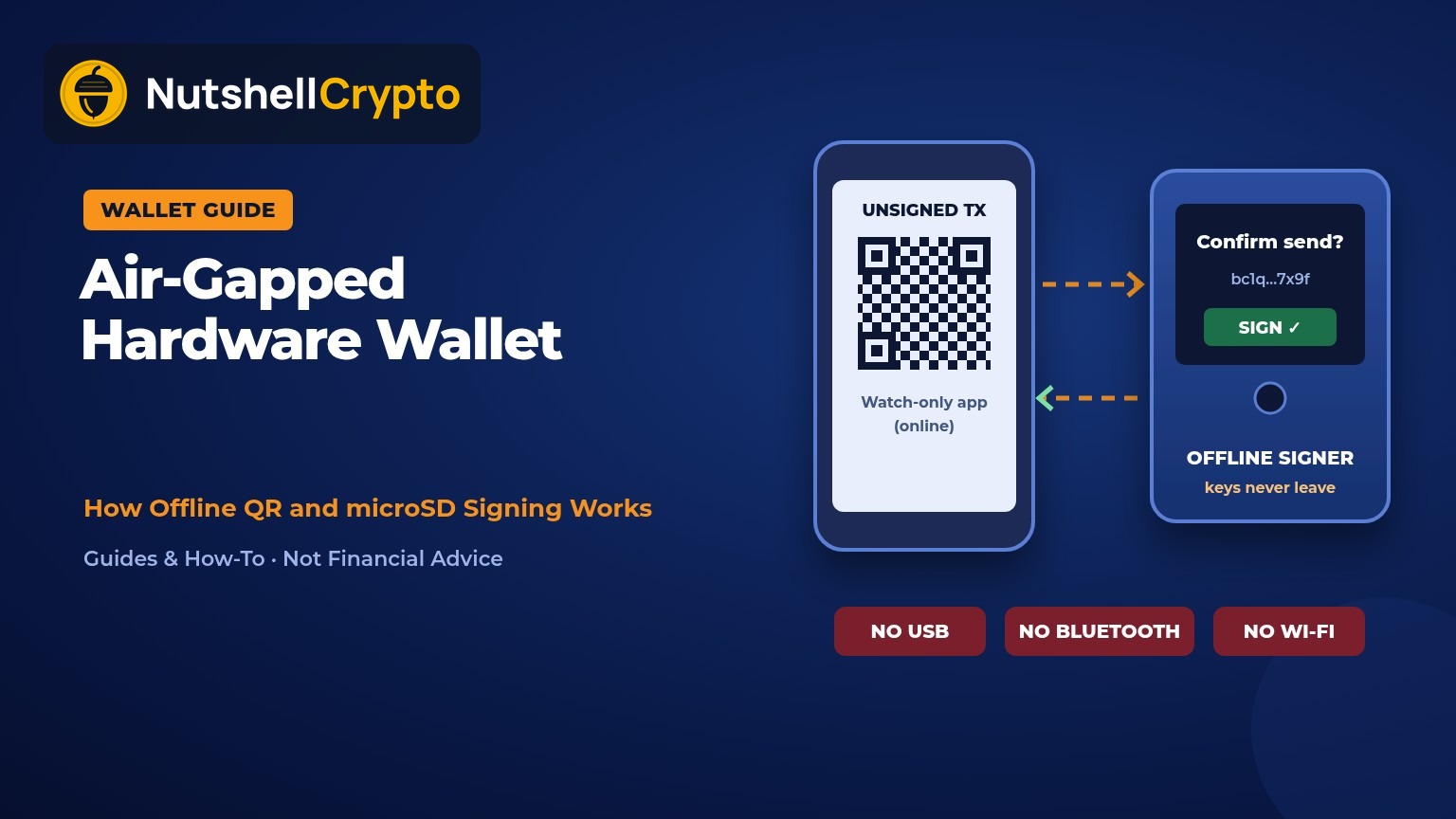
In a nutshell: An air-gapped hardware wallet is a crypto wallet device that never connects to a computer or phone through USB data, Bluetooth, Wi-Fi or NFC while it signs transactions. Your wallet app builds an unsigned transaction, you pass it to the device by QR code or microSD card, the device signs it offline, and you pass the signed result back the same way. Your private keys never travel over a cable or a radio link. It cuts down remote attack paths, but it is slower to use, and it does not protect you from a lost seed phrase, a fake device, or sending to the wrong address. Educational only; not financial advice.
Last updated: October 26, 2026.
Every hardware wallet keeps your private keys off the internet. The difference is how the device talks to the app on your phone or computer when you want to send crypto. Most hardware wallets use a USB cable or Bluetooth. An air-gapped hardware wallet skips those links and moves data in a way you can see and control, usually QR codes on a screen or files on a microSD card.
This guide explains what “air-gapped” really means, how signing works step by step, which devices use this design, and the trade-offs to weigh before you choose one.
Table of contents
What Is an Air-Gapped Hardware Wallet?
“Air gap” is a security term, not a crypto invention. The US National Institute of Standards and Technology (NIST) defines an air gap as an interface between two systems that are not physically connected, where any data transfer happens “only manually, under human control.”
Applied to crypto, an air-gapped hardware wallet is a cold wallet that stays offline during signing and has no automatic data link to an online device. You are the bridge. You hold the QR code up to a camera or move the memory card by hand, so nothing can pass between the two devices without you doing it.
The device still holds your private keys, which are generated from your seed phrase. Your coins never sit “on” the device. They stay on the blockchain, and the device only proves you own them by signing transactions.
How Air-Gapped Signing Works
An air-gapped wallet splits the job into two halves. An online app (sometimes called a “watch-only” wallet) knows your public addresses and balances but cannot spend. The offline device holds the keys and can sign, but never sees the internet.
- Pair once with public data. The device shows a QR code or saves a file containing your public key (often an “xpub”). The app imports it so it can show balances and create new receive addresses. No private key leaves the device.
- Build the transaction online. In the app you enter the address, amount and fee. The app creates an unsigned transaction.
- Move it to the device. The app shows the unsigned transaction as a QR code (or animated QR codes for bigger ones), or saves it to a microSD card.
- Check and sign offline. The device reads it, shows the destination, amount and fee on its own screen, and signs only after you approve.
- Move the signature back. The device shows a signed QR code or writes a signed file. The app reads it and broadcasts the transaction to the network.
For Bitcoin, this flow is standardized as the Partially Signed Bitcoin Transaction format, or PSBT. Its specification, BIP 174, says the format lets “offline signers such as air-gapped wallets and hardware wallets” sign without needing a live connection to the blockchain. PSBT is also what makes air-gapped multisig wallets practical, because one transaction can be passed between several devices for signatures.
SafePal describes the same steps for its S1 device in its air-gapped signing help article: the app creates the transfer, the S1 scans it, you verify and sign on the device, and the app broadcasts the result.
QR Codes vs microSD vs NFC
| Method | How it works | Strengths | Drawbacks |
|---|---|---|---|
| QR codes | Device camera scans the app’s code; app camera scans the device’s code | You can see exactly when data moves; no cable or radio | Large transactions need animated codes; needs good light and a working camera |
| microSD card | Unsigned file saved to a card, card moved to the device, signed file moved back | Handles large files and batches; common for Bitcoin PSBT | Slower; you must trust the card and the computer that writes to it |
| NFC tap | Short-range radio tap between phone and device | Fast and convenient | It is a radio link, so strict air-gap users often turn it off |
NFC sits in a grey zone. It is short-range, but it is still a radio link, so people who want a strict air gap often turn it off. On the COLDCARD Q, COLDCARD’s documentation says NFC and USB data can be switched off in the settings or blocked permanently by scratching marked traces on the circuit board.
Air-Gapped vs USB and Bluetooth Hardware Wallets
| Feature | Air-gapped wallet | USB or Bluetooth wallet |
|---|---|---|
| Connection while signing | None: QR code or memory card | Cable or wireless link to a phone or computer |
| Remote attack surface | Smaller; no driver, cable or radio path | Larger, though keys still stay inside the device |
| Ease of use | Slower, more steps | Faster, plug in or pair and confirm |
| Power | Often a built-in battery or AAA cells | Often powered over USB |
| Best fit | Long-term savings, larger balances, multisig | Frequent sending and app use |
A well-designed USB or Bluetooth wallet also keeps private keys inside a secure chip, so it is not “unsafe.” The air gap simply removes one more path an attacker could try, and it makes every data transfer a visible, deliberate step. If you are still deciding between wallet types in general, start with our crypto wallets for beginners guide.
Examples of Air-Gapped Wallet Designs
The list below shows how different makers approach the air gap. It is not a ranking or a buying recommendation. Features change with firmware, so check each maker’s current page.
- COLDCARD Q (Bitcoin only): QR scanner, two microSD slots and power from three AAA batteries, according to COLDCARD’s Q overview. It also has NFC and USB, which can be switched off or physically disabled.
- Keystone 3 Pro (multi-coin or Bitcoin-only firmware): signs with QR codes and supports microSD, with a 4-inch touchscreen and three secure element chips, per Keystone’s product page. USB-C is used for charging and firmware updates.
- NGRAVE ZERO: NGRAVE says on its ZERO page that the device does not use USB, Bluetooth, NFC, Wi-Fi or 4G to sign, and communicates only via QR codes.
- SafePal S1: communicates with the SafePal app through QR codes, with no USB or radio involved in signing, according to SafePal’s help center article linked above.
- Foundation Passport Core: a QR and microSD air-gapped Bitcoin wallet. Foundation says on its blog that Passport Core is no longer for sale but is still supported, and that the newer Passport Prime uses an encrypted Bluetooth protocol, so it is not QR-only.
Another thing to check is whether the firmware is open source. Our guide to open-source crypto wallets explains why that matters for verifying what a device really does.
What an Air Gap Does Not Protect You From
An air gap blocks one kind of risk: malware or a remote attacker reaching the keys through a connection. It does nothing for these:
- A lost or exposed seed phrase. Anyone with your recovery words can rebuild your wallet on any device. If you lose them and the device breaks, the funds are gone.
- A tampered or fake device. Buy only from the maker or an authorized reseller, and never use a device that arrives with a seed phrase already written down.
- Signing a bad transaction. If malware on your phone swaps the destination address, the device will still sign what you approve. Always compare the full address on the device screen.
- Phishing and fake apps. A fake companion app can show you wrong balances or ask for your seed phrase. No real wallet app needs your recovery words.
- Physical theft and coercion. A PIN, an optional passphrase and a multisig setup help here; the air gap does not.
Who Should Consider One?
An air-gapped wallet makes the most sense if you hold a meaningful amount for the long term and rarely move it, if you run a multisig setup across several devices, or if you simply want every data transfer to be visible. If you send crypto several times a week, a USB or Bluetooth hardware wallet may be easier to live with. Many people use both: a small spending wallet and an air-gapped savings wallet.
When you are ready to move coins off an exchange, our step-by-step guide on how to transfer crypto to a cold wallet covers test transactions and network choice. For the bigger picture on holding your own keys, see our self-custody guide.
Tips for Using an Air-Gapped Wallet Safely
- Write your seed phrase on paper or metal, never in a photo, cloud note or password manager, and store it away from the device.
- Do a small test send and a test recovery before moving larger amounts.
- Check the receive address on the device screen, not only in the app.
- Update firmware only from the maker’s official site, and verify the file if the maker provides a way to do so.
- If you use microSD, use a card only for wallet files and keep it with the device.
- Turn off NFC or USB data if your device allows it and you do not need them.
FAQ
Is an air-gapped wallet the same as a cold wallet?
Not exactly. Every air-gapped hardware wallet is a cold wallet, but not every cold wallet is air-gapped. Many cold wallets keep keys offline but still connect over USB or Bluetooth to sign.
Is a paper wallet air-gapped?
A paper wallet is offline, but spending from it usually means typing or importing the key into software, which exposes it. An air-gapped device signs without the key ever leaving it.
Can an air-gapped wallet be hacked?
Remote attacks are much harder because there is no data connection. The main risks become physical access, supply-chain tampering, a stolen seed phrase, and tricking you into approving a bad transaction.
Does an air-gapped wallet work with Ethereum and other coins?
Some do. Multi-coin air-gapped devices pair with wallet apps over QR codes for Ethereum and other chains, while others, such as the COLDCARD Q, are Bitcoin only. Check the maker’s supported-assets list.
Do I need a computer to use one?
Usually you need a phone or computer running a watch-only wallet app to build and broadcast transactions. The device itself never connects to it.
This article is for education only and is not financial advice. Product features change with firmware updates; check each maker’s official documentation before buying.