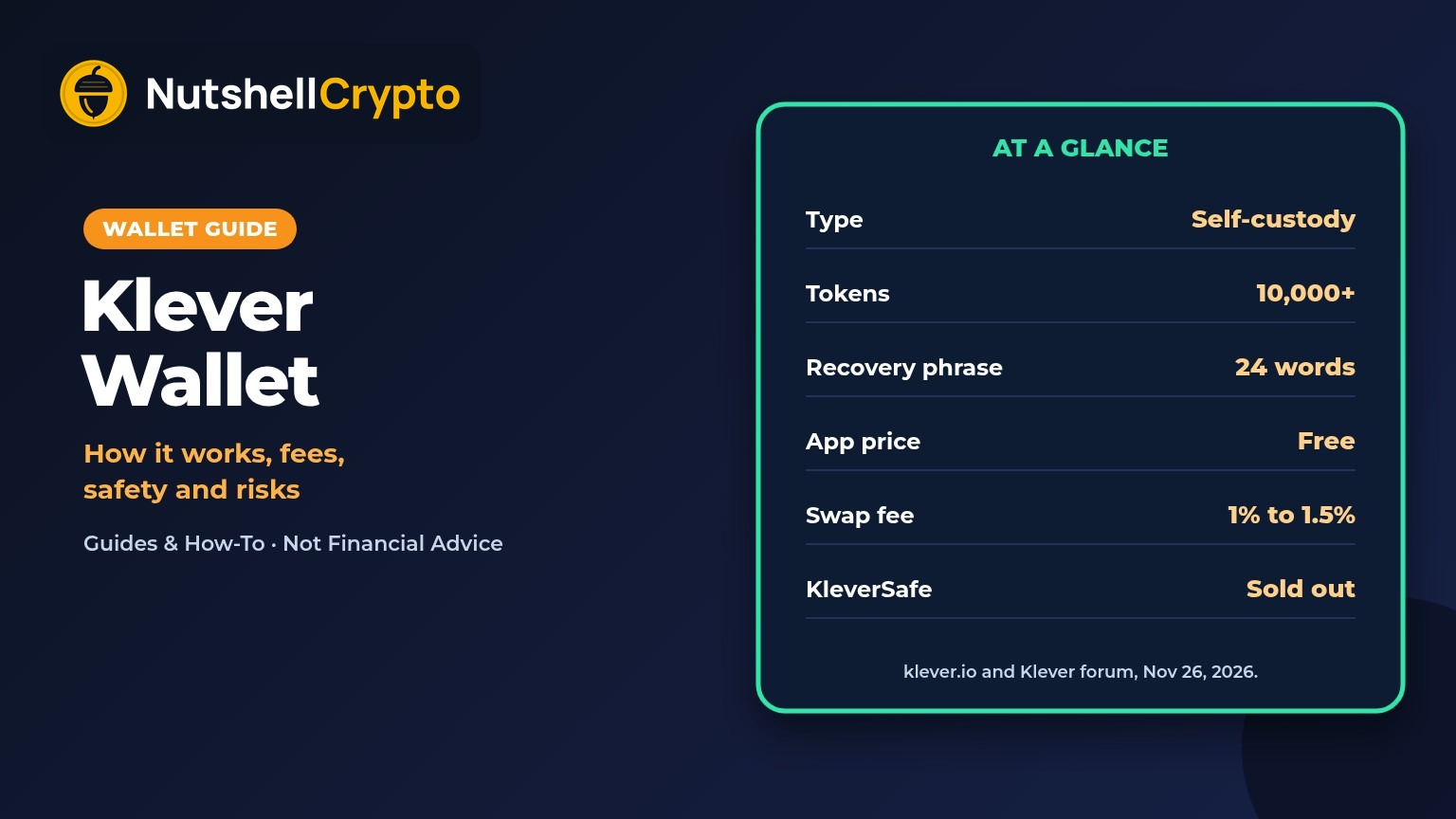
In a nutshell: Klever Wallet is a free, self-custody multichain wallet app (with a browser extension) that holds Bitcoin, Ethereum, TRON, Solana and thousands of other tokens, and you control the keys through a 24-word recovery phrase. Storing, sending and receiving cost only the blockchain’s network fee, while in-app swaps carry a 1% to 1.5% service fee. Klever Blockchain had a serious exploit in June 2026, the KleverSafe hardware wallet was sold out when we checked, and fake “Klever” sites are common, so use only the official app listings and klever.io or klever.org. Educational only; not financial advice.
Klever Wallet is a non-custodial crypto wallet for iPhone, Android and desktop browsers, made by the Klever team behind the Klever Blockchain and its KLV token. According to Klever’s homepage, you can buy, stake, swap and store crypto in it without handing your keys to a company.
This guide covers how Klever Wallet works, which assets it supports, the KleverSafe hardware wallet, the fees (checked on November 26, 2026), the June 2026 exploit, how to avoid fake Klever sites and apps, how to set it up, and short tax notes for the US, Canada and Australia.
Table of contents
- What is Klever Wallet?
- How Klever Wallet works
- Supported assets
- KleverSafe hardware wallet
- Klever Wallet fees
- Is Klever Wallet safe? The 2026 exploit and other risks
- Official sites and fake Klever scams
- How to use Klever Wallet
- Availability in the US, Canada and Australia
- US, Canada and Australia tax notes
- FAQ
What Is Klever Wallet?
Klever Wallet is a self-custody wallet, which means the app creates and stores your private keys on your own device. Klever’s terms of use say the team does not have access to or control over your private keys or funds, and it can’t retrieve a lost wallet password for you.
The company says more than 4 million users in 190 countries use the wallet. That is Klever’s own figure, not an independent count. The Klever team also runs Klever Blockchain, its own layer 1 network, and the KLV token that powers it. The wallet works with many other chains too, so you don’t need to touch KLV to use it.
The wallet comes in three forms: the mobile app (the main product), a browser extension for connecting to dApps, and the optional KleverSafe hardware device.
How Klever Wallet Works
When you create a wallet, the app generates a 24-word recovery phrase following the BIP39 standard. Klever’s seed phrase guide, posted on February 25, 2026, says this phrase controls your crypto across all supported blockchains and that Klever cannot recover it for you. Klever previously used 12-word phrases and moved all new wallets to 24 words. Our seed phrase guide explains how to store one safely.
Your private keys are encrypted and kept on your device, not on Klever’s servers, according to the App Store listing. Because the wallet is “hot” (connected to the internet), it is convenient for daily use but carries more exposure than offline storage; see hot wallet vs cold wallet for the trade-off.
Other features listed on Klever’s site and the app stores:
- Buy: purchases by card, Apple Pay, Google Pay or bank transfer go through third-party partners, whose terms and fees apply.
- Swap: in-app swaps across chains. Klever says no registration or KYC is needed to swap.
- Stake: the App Store lists staking for KLV, KFI, DVK, DOT and KSM.
- Bitcoin Lightning and Bitcoiner Mode: a simplified Bitcoin-only view that uses the same recovery words.
- Web3 browser: built-in access to dApps, DeFi and NFT marketplaces.
Supported Assets
Klever’s assets page says the wallet supports more than 10,000 tokens and NFTs. The Google Play listing names these networks:
- Bitcoin, Ethereum, Solana, TRON and BNB Smart Chain
- Klever Blockchain, Polkadot, Avalanche, Cardano and Sui
- Stellar, ICP, Reef and Dogecoin
It also lists token standards such as ERC-20, TRC-20, SPL, BEP-20 and Klever’s KDA. A longer coin list does not mean every coin is safe or liquid. Check a token’s contract address before you add or swap it, and see how wallet addresses work for sending to the right network.
KleverSafe Hardware Wallet
KleverSafe is Klever’s own hardware wallet. Its product page says the device keeps your private key in a secure element with Common Criteria EAL5+ certification (Klever’s claim), pairs with the Klever Wallet app over Bluetooth 5.2 or USB-C, supports more than 200 accounts, and is waterproof. Transactions are signed inside the device, so the key does not leave it.
Important: when we checked on November 26, 2026, the KleverSafe store page said “KleverSafe units are currently sold out” and pointed readers to the app. We could not find a price or restock date on the page. Be careful with listings on third-party marketplaces, because the official store is on klever.io. Klever’s setup guide covers pairing for people who already own one.
If you want a different offline option, see our guides to the Tangem wallet and the Bitkey wallet, or read how to move crypto to a cold wallet.
Klever Wallet Fees
Checked on November 26, 2026, on Klever’s pages and forum:
- App and wallet: free. Klever’s terms say no fees are currently charged for the self-custody wallet and browser, but Klever reserves the right to charge in future.
- Send and receive: Klever says it does not charge for sending or receiving. You pay the network fee of the chain you use, such as ETH, TRX or BNB. On Klever Blockchain, fees are paid in KLV.
- Swaps: the swap fee guide says the service fee is 1% to 1.5% of the swapped amount. It can be reduced by paying in KLV or using Rewards Points. You also pay a network fee to send tokens in and a delivery fee to receive them on the destination chain. The app shows the final amount before you confirm.
- Buying crypto: priced by the partner provider, not Klever, per the terms.
Example: on a $1,000 swap, a 1% to 1.5% service fee is $10 to $15 before network and delivery fees. Compare the final amount shown in the app with other options, and read Klever’s note on service fees vs blockchain fees for how it splits them.
Is Klever Wallet Safe? The 2026 Exploit and Other Risks
The wallet is self-custody, so the main risks are your own habits: losing the recovery phrase, installing a fake app, or signing a bad transaction. On top of that, there are Klever-specific points worth knowing.
The June 2026 Klever Blockchain exploit
Klever’s security incident report, posted on June 6, 2026, says an attacker exploited a flaw in the NFT marketplace settlement logic on Klever Blockchain between June 4 and June 5, 2026 and created 486,357,300.26 KLV that did not exist before. The fix was deployed on June 5, 2026. The report describes a chain-level bug, not a theft of keys from phones.
Klever’s June 10 update said KLV swap was restored inside the wallet. Its final update on July 21, 2026 said the whole ecosystem was back, but that the burn of the unregistered KLV and a buyback program would only run together once legal clearance is granted. If you hold KLV, those open supply questions matter; if you only hold Bitcoin or stablecoins in the app, the incident mainly explains why swaps were paused for a time. An independent write-up at getbitcoin.guide reaches a similar reading, though it is a small site, so check Klever’s own reports.
Other things to know
- Ongoing security work: Klever’s roadmap post of November 20, 2026 says four security releases (v1.7.19 to v1.7.22) followed the incident, a CertiK audit is ongoing, and no new feature target is set before year-end.
- Exchange status: in a notice dated November 23, 2026, Bitget said it suspended KLV deposits and withdrawals on the Klever network for wallet maintenance, with no resume time given. Check the exchange before moving KLV.
- App reviews: on November 26, 2026, the App Store showed 4.8 from about 1.1K ratings and Google Play 4.6 from about 6.8K reviews. One recent Play review complains about fees and taxes charged before withdrawals, so read recent reviews yourself.
- Android issues: Klever’s forum posted a workaround for crashes and keyboard glitches on February 17, 2026. Back up your phrase before updating or reinstalling.
- Code: we did not review the wallet’s code or check whether it is open source. See our guide to open source crypto wallets if that matters to you.
Official Sites and Fake Klever Scams
Many readers search “Klever Budget” or “is Klever legit” after seeing an ad or a message. We could not find any product called Klever Budget on klever.io, klever.org or the Klever forum, so treat any app, site or account using that name as unverified until you can match it to an official page. We are not saying it is a scam, only that we found no official source for it.
Klever’s two official domains are:
- klever.io: the wallet site, linking to the official App Store and Google Play listings, the KleverSafe store and the support center at support.klever.org.
- klever.org: the Klever Blockchain site, which hosts the forum at forum.klever.org.
Klever’s own phishing guide warns about look-alike addresses, for example swapped letters, extra words like “support,” or the wrong ending, and says never to click links in unsolicited messages claiming to be Klever support. Its anti-scam page adds that no legitimate service will ask for your seed phrase. Klever also documented a 2021 fake airdrop site that copied its branding.
- Install only from the App Store or Google Play links on klever.io. The Play developer email is dev@klever.io.
- Never type your recovery phrase into a website, chat or “validation” form.
- Ignore DMs offering support, airdrops or “wallet sync.”
- Bookmark klever.io instead of searching for it each time.
How to Use Klever Wallet
Klever’s setup guide walks through the basics. In short:
- Install the app from the official listing and tap Create Wallet.
- Set a PIN and, if you want, fingerprint or face unlock.
- Back up the 24-word phrase on paper, offline, and confirm it in the app. Never take a screenshot.
- Pick which coins to show, then tap Receive to see the address and QR code for that network.
- Send a small test amount first. Wrong-network sends can’t be reversed.
- To swap or buy, use the in-app tools and compare the final amount before you confirm.
Availability in the US, Canada and Australia
When we checked on November 26, 2026, the US App Store listing and the US Google Play listing both loaded. Klever’s terms say some countries may be excluded for legal reasons and that partner services such as buying crypto can be limited by location, but we found no list that names the US, Canada or Australia. Open the app and look at which buy and swap options appear for your location. We did not test buying from the US, Canada or Australia.
US, Canada and Australia Tax Notes
United States: The IRS says digital assets are treated as property. Moving coins between wallets you own is not a transaction, unless you pay the fee in crypto. Swapping one coin for another in the app, selling, or spending crypto must be reported and can create a gain or loss. Staking rewards received count as a reported receipt on the IRS list. See our crypto taxes guide and staking taxes guide.
Canada: The CRA says crypto users must report earnings or losses on their income tax return, as business income or capital gains. Its list of dispositions includes trades and spending crypto on goods or services, and it lists staking rewards as an acquisition. Read our guide to cryptocurrency tax in Canada and whether transferring crypto is taxed.
Australia: The ATO explains how capital gains tax applies to crypto and what records to keep on its crypto asset investments page. Keep swap and fee records from the app.
FAQ
Is Klever Budget legit?
We found no product called Klever Budget on klever.io, klever.org or the Klever forum, so we can’t confirm it is legit. Klever’s anti-scam page tells users to verify every link and app before they sign or connect a wallet. Use only the official Klever Wallet listings reached from klever.io.
What are fake crypto wallets?
Fake crypto wallets are apps or websites that copy a real wallet’s name and look, then steal your recovery phrase or funds. Klever’s phishing guide lists look-alike domains, unsolicited “support” links and fake airdrops as common signs. Download only from official app store links and never enter your phrase into a site.
Can someone steal crypto from my wallet?
Yes, if they get your recovery phrase or trick you into signing a harmful transaction, because that gives them control of your keys. Klever’s seed phrase guide says anyone with your phrase can access your funds and Klever can’t recover it. Keep it offline, don’t share it and check what you approve before you sign.
Can my crypto wallet be hacked?
The wallet app’s encryption is rarely the weak point; phishing, fake apps, malware and leaked phrases are more common. Klever’s security tips include enabling 2FA on linked accounts, revoking old dApp permissions and keeping software updated. For larger balances, a cold wallet keeps keys offline.
This article is for education only and isn’t financial or tax advice. Fees, features and availability change; check Klever’s current pages before you use or buy anything.