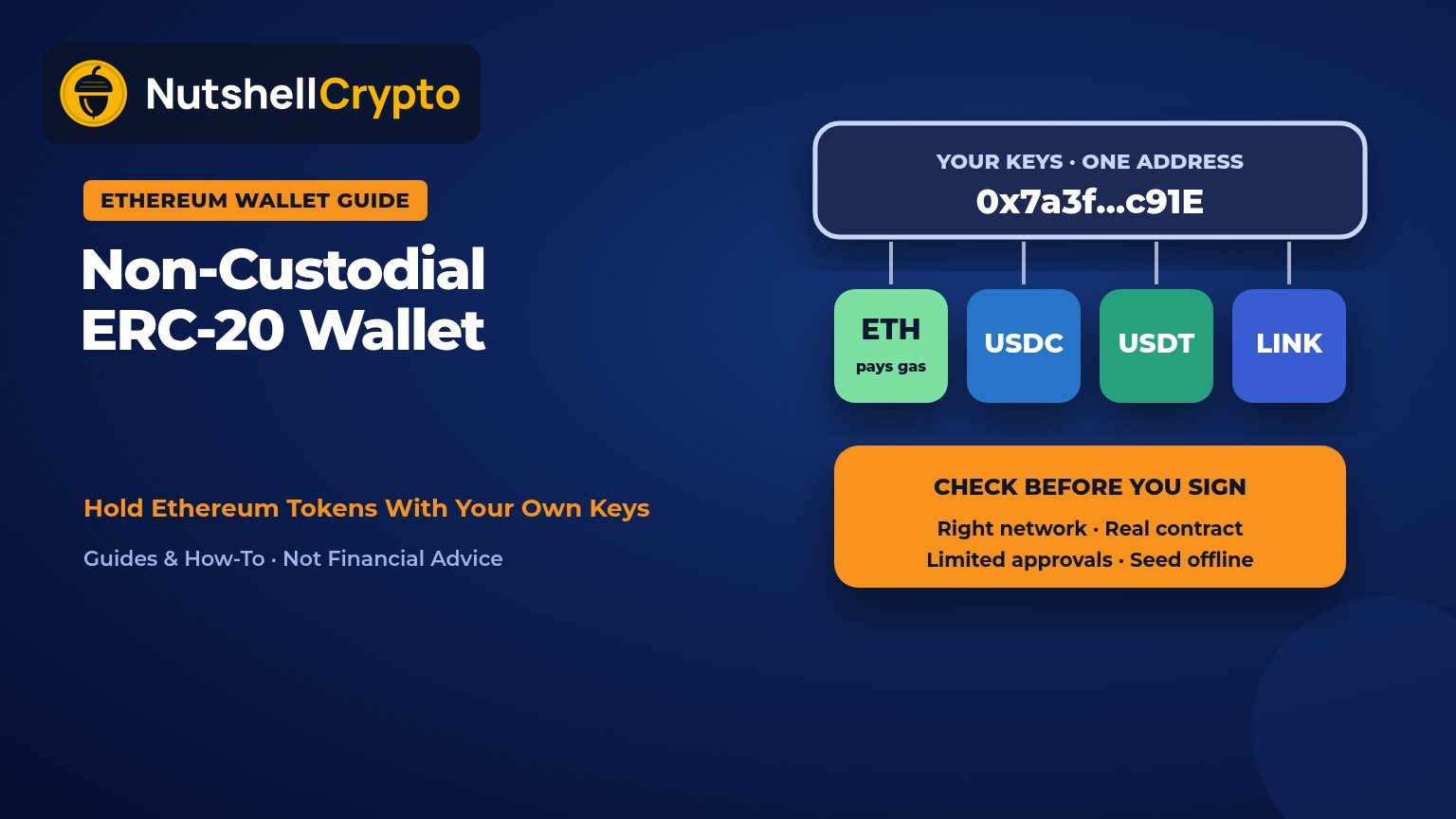
In a nutshell: A non-custodial ERC-20 wallet is any Ethereum wallet where you, not a company, hold the private key. ERC-20 tokens such as USDC, USDT and LINK never sit “inside” the wallet; they are balances recorded in each token’s smart contract on Ethereum, and your key is what lets you move them. One 0x address holds ETH and every ERC-20 token, you need a little ETH to pay gas, and the main risks are your own: a lost seed phrase, the wrong network, fake tokens and token approvals you forgot about. Educational only; not financial advice.
Last updated: October 28, 2026.
Buy USDC or LINK on an exchange and the exchange holds the tokens for you. Withdraw them to a wallet you control and the job changes hands: you now guard the keys, pick the network and approve every transaction yourself.
This guide explains how ERC-20 tokens actually work, what “non-custodial” means for them, and the handful of mistakes that cause most ERC-20 losses. Wallet names below are examples only, not recommendations.
Table of contents
- What is an ERC-20 token?
- What makes an ERC-20 wallet non-custodial?
- Custodial vs non-custodial for ERC-20 tokens
- One 0x address for ETH and every token
- Why you need ETH to move tokens
- Token approvals and how to revoke them
- Wrong-network mistakes
- Adding custom tokens and spotting fakes
- Backing up the seed phrase
- ERC-20 tokens on a hardware wallet
- Setting up: a short checklist
- Taxes in brief
- FAQ
What Is an ERC-20 Token?
ERC-20 is Ethereum’s standard for fungible tokens, meaning tokens where every unit is identical to every other unit. It was written up as EIP-20 by Fabian Vogelsteller and Vitalik Buterin, created on November 19, 2015 (EIP-20).
The standard is a short list of functions that every compliant token contract offers, so wallets and apps can handle any token the same way. The key ones are (ethereum.org):
- balanceOf: how many tokens an address holds
- transfer: send tokens from your address to another one
- approve and allowance: let another address or app spend up to a set amount of your tokens
- transferFrom: used by that approved app to actually move the tokens
The important idea for wallet users: the token’s balances live in its contract on Ethereum, not on your phone. USDT on Ethereum, for example, is one contract at 0xdAC17F958D2ee523a2206206994597C13D831ec7 (Tether), and Circle lists USDC on Ethereum at 0xA0b86991c6218b36c1d19D4a2e9Eb0cE3606eB48 (Circle). Your “balance” is simply a number next to your address in that contract.
What Makes an ERC-20 Wallet Non-Custodial?
A wallet does not store tokens. It stores, or helps you protect, the private key that signs transactions from your address. Ethereum’s own docs describe an account as a pair of cryptographic keys, with the private key used to sign transactions (ethereum.org).
So “non-custodial” comes down to one question: who holds that key? If only you do, through a seed phrase you wrote down, the wallet is non-custodial. Phone and browser apps such as MetaMask or Trust Wallet, and hardware devices such as Ledger, are common examples of this setup (Trust Wallet; Ledger Support). For the wider picture beyond Ethereum, see our guide to self-custody in crypto.
Custodial vs Non-Custodial for ERC-20 Tokens
| Custodial (exchange account) | Non-custodial ERC-20 wallet | |
|---|---|---|
| Who holds the key | The exchange | You |
| Gas for token transfers | Exchange charges a withdrawal fee instead | You pay gas in ETH on every transfer and approval |
| Using DeFi apps | Usually not possible directly | Connect to apps and sign approvals yourself |
| Forgot password | Account recovery through support | Only your seed phrase can restore access |
| Main risk | Company failure, freezes, hacks | Your own mistakes, phishing, bad approvals |
Neither is risk-free. Our guide to custodial wallets covers the trade-offs of leaving tokens on a platform.
One 0x Address for ETH and Every Token
You do not need a separate wallet for each token. On Ethereum and compatible networks, an address starts with 0x followed by 40 characters, 42 in total (MetaMask Support). That same address receives ETH and any ERC-20 token.
Ledger puts it plainly: an ERC-20 token like LINK does not need its own account; it sits in your Ethereum account, and you receive it with your Ethereum address (Ledger Support).
One catch: MetaMask notes your address is also the same on other EVM networks such as BNB Chain, Polygon and Avalanche C-Chain (MetaMask Support). That is convenient, but it also explains why tokens sent on the “wrong” EVM network can seem to vanish. More on that below. For address basics in general, see what a crypto wallet address is.
Why You Need ETH to Move Tokens
Holding ERC-20 tokens costs nothing, but moving them does. Every token transfer, approval and revocation is an Ethereum transaction, and gas is paid in ETH, not in the token you are sending. Ledger says your Ethereum account must hold enough ETH to cover network fees before you can send ERC-20 tokens from it (Ledger Support).
This is the most common surprise for new users: a wallet full of USDC that cannot move a single cent because the ETH balance is zero. Keep a small ETH buffer in the same address. Our guide to Ethereum gas fees explains how the cost is worked out and how to pay less.
Token Approvals and How to Revoke Them
When you use a decentralized exchange or lending app, it usually asks for an approval first. Under EIP-20, approve lets a “spender” withdraw from your account multiple times, up to the amount you set (EIP-20). Plain ETH does not need this step; MetaMask notes only tokens such as ERC-20s require these spending caps (MetaMask Support).
The risk is that approvals do not expire on their own. An approval stays valid until it is used up or you sign a new transaction that revokes it, and apps often request an amount so large it is effectively unlimited. If that app is malicious or later hacked, the tokens you approved can be drained (MetaMask Support).
Scammers use this on purpose. Chainalysis estimated that victims lost about $1.0 billion to “approval phishing” from May 2021 to late 2023, including $374.6 million in 2023 through November (Chainalysis).
How to check and revoke approvals
- Open a token approval checker. Etherscan has one at etherscan.io/tokenapprovalchecker, and MetaMask’s help center points to block-explorer checkers like it (MetaMask Support).
- Paste your 0x address (or connect your wallet) and review each token, spender and allowed amount.
- Revoke anything you no longer use or do not recognize. A revocation is an on-chain transaction, so it costs gas.
- When approving in future, set a spending cap close to the amount you actually plan to use.
Note that “disconnecting” a site from your wallet is not the same as revoking. MetaMask explains that disconnecting only stops a site seeing your address; only a revoke removes its right to move your tokens (MetaMask Support). MetaMask suggests checking approvals regularly, for example monthly.
Wrong-Network Mistakes
The same token name can exist on many blockchains. Tether issues USDT on Ethereum (ERC-20), on Tron (TRC-20), and on chains such as Solana, Avalanche, TON and others, and warns that senders must check they are using the right transport protocol (Tether; Tether networks).
When you withdraw to a non-custodial ERC-20 wallet, choose the Ethereum (ERC-20) network on the exchange, unless your wallet is set up for another network. Ledger warns that picking a different network type can mean your tokens never show up in the app (Ledger Support).
- Tron addresses start with T and Ethereum addresses with 0x, so most apps block a TRC-20 to 0x mistake before it happens.
- EVM chains are the trap. Because your 0x address is the same on BNB Chain or Polygon, a token sent there usually is not lost; it sits at your address on that chain. You may need to add that network to your wallet, plus some of that chain’s own coin for gas (BNB on BNB Chain, POL on Polygon) to move it (MetaMask Support).
- Never send tokens to a token’s own contract address. ethereum.org says at least $83.6 million of ERC-20 tokens had been lost as of June 2024 by sending them to contracts that cannot handle them, most often the token contract itself (ethereum.org).
If you mostly hold dollar tokens, our stablecoin wallet guide compares the main USDT and USDC networks, and USDT vs USDC covers how the two issuers differ.
Adding Custom Tokens and Spotting Fakes
Wallets do not always display every token you own. MetaMask, for instance, only auto-detects tokens on curated lists; anything else you add as a “custom token” by pasting its contract address (MetaMask Support). The tokens are on-chain either way; adding them only changes what the app shows.
Anyone can create an ERC-20 token with any name, including “USDC” or “Tether”. So the name proves nothing. The contract address is what matters:
- Get contract addresses from the issuer’s own site (such as Tether or Circle above) or a major data site, and check them on Etherscan. MetaMask points users to block explorers and token listing sites for this (MetaMask Support).
- Ignore random tokens that appear in your wallet. MetaMask explains that unknown airdrops are a common lure: trying to sell them sends you to a site that asks for an approval or your recovery phrase (MetaMask Support).
- Watch for address poisoning: tiny transfers from a lookalike address that matches the first and last characters of one you use, hoping you copy it from your history later. Check the middle characters too, and save trusted addresses as contacts (MetaMask Support).
Backing Up the Seed Phrase
Your seed phrase (often 12 or 24 words) is the master backup for your key, and with it every ERC-20 token at your address. There is no “forgot password” button in a non-custodial wallet. Write it on paper or metal, keep it offline, and never type it into a website, chat or “support” form. MetaMask’s rule is blunt: never give your recovery phrase to a website or anyone online (MetaMask Support).
Our full guide to the seed phrase covers storage options and common backup mistakes.
ERC-20 Tokens on a Hardware Wallet
A hardware wallet keeps the private key on a separate device, so a phone or laptop never sees it. For ERC-20 tokens it works the same way as a software wallet: you add an Ethereum account and your tokens appear under it. Ledger, for example, says you can manage all ERC-20 tokens with its devices, even if some do not display in its app (Ledger Support). Unsupported tokens are still at your address and can be viewed by connecting the device to another interface such as MetaMask (Ledger Support).
The big extra safety check is on-screen confirmation. You verify the receive address on the device itself, and most hardware wallets also make you confirm the destination before sending, which helps against address-swapping malware and poisoning (MetaMask Support). Note that a hardware wallet does not protect you from an approval you sign yourself, so read what you are approving. For a step-by-step move, see how to transfer crypto to a cold wallet.
Setting Up: A Short Checklist
- Download the wallet app only from the official site or app store listing.
- Create a new wallet and write the seed phrase down offline. Confirm it.
- Copy your 0x address from the app (or verify it on your hardware device).
- Send a small test amount first, choosing the Ethereum (ERC-20) network on the exchange.
- Add a little ETH to the same address for gas.
- If a token does not show, add it by contract address from an official source.
- Review and revoke old token approvals every so often.
Taxes in Brief
Moving tokens between wallets you own is generally not a sale, but gas fees and later swaps can have tax effects. The IRS treats digital assets as property (IRS), and the CRA has its own crypto guidance for Canadians (CRA). See if I transfer crypto, do I pay taxes? for details, and keep records of each transfer.
FAQ
Is MetaMask a non-custodial ERC-20 wallet?
Yes. MetaMask is a self-custody wallet: your Secret Recovery Phrase controls the address, so keeping it safe is your job. It holds ETH and ERC-20 tokens at the same 0x address.
Do I need a separate address for USDT and USDC?
No. On Ethereum, one 0x address holds ETH and every ERC-20 token. Just make sure the sender uses the Ethereum (ERC-20) network.
Why can’t I send my ERC-20 tokens?
Most often because there is no ETH in the same address to pay gas. Add a small amount of ETH and try again.
My tokens don’t show in my wallet. Are they lost?
Usually not. Check your address on Etherscan. If the tokens are there, add the token by its official contract address. If they are not there, check whether they were sent on another network.
Is an ERC-20 cold wallet safer?
A hardware or “cold” wallet keeps the key off internet-connected devices, which lowers the risk of malware stealing it. It does not stop phishing approvals or a lost seed phrase.
Can a non-custodial wallet freeze my tokens?
The wallet app cannot, but some token issuers can. Circle’s USDC terms, for example, say Circle reserves the right to block certain USDC addresses (Circle). Our stablecoin wallet guide covers freezes in more detail.
Sources
- EIP-20: Token Standard
- ethereum.org: ERC-20 Token Standard
- ethereum.org: Ethereum accounts
- Tether: Supported protocols
- Tether: Networks
- Circle: USDC contract addresses
- MetaMask Support: Ethereum address format
- MetaMask Support: Spending caps
- MetaMask Support: Revoking token approvals
- MetaMask Support: Displaying tokens
- MetaMask Support: Address poisoning scams
- Ledger Support: Manage ERC20 tokens
- Chainalysis: Approval phishing scams
- Etherscan: Token approval checker
- IRS: Digital assets
- CRA: Guide for cryptocurrency users
This article is for education only and is not financial, tax or legal advice. Wallet features and supported tokens change; check the official help pages of any wallet before you use it.