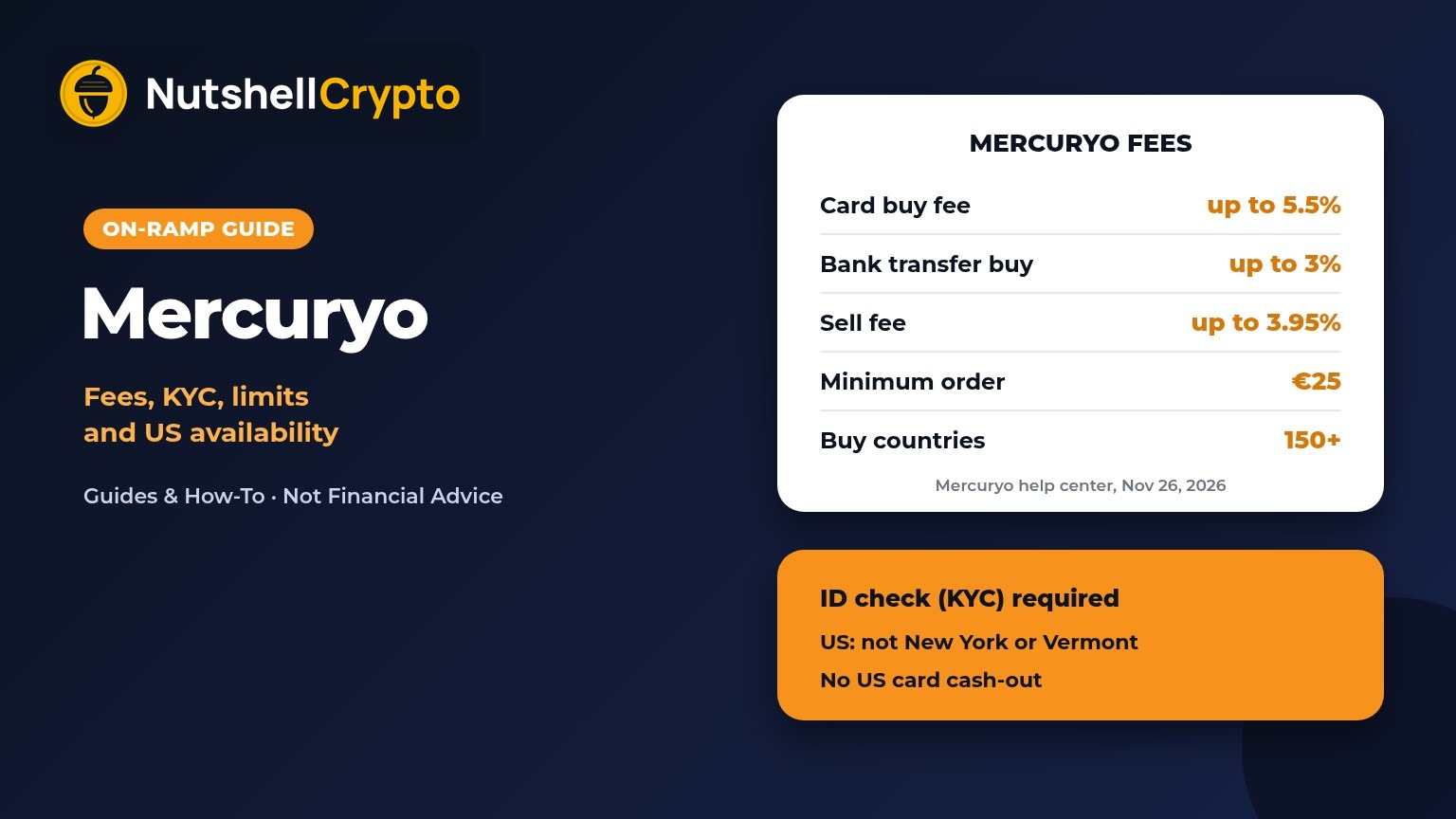
In a nutshell: Mercuryo is a crypto payments company whose “Buy crypto” widget runs inside wallets like Trust Wallet, MetaMask and Ledger, and which also offers its own custodial Mercuryo wallet app. You pay by card, Apple Pay, Google Pay or bank transfer, and the crypto goes to your wallet. Mercuryo’s fee is up to 5.5% for card buys and up to 3.95% for sells, plus network fees and a spread. You must pass ID checks (KYC) to buy or sell. It works in the US (not New York or Vermont), Canada and Australia, but US users can’t cash out to a card. Educational only; not financial advice.
Mercuryo is a fiat-to-crypto on-ramp and off-ramp: it lets you buy crypto with regular money, or sell crypto back to fiat, either inside a partner wallet or through Mercuryo’s own app and web widget. Most people meet it as a payment option in a wallet’s Buy screen, not as a standalone exchange.
This guide explains how Mercuryo works, the Mercuryo wallet, fees, ID checks, payment methods, limits, which countries can use it, how to sell and withdraw, its licenses and risks, and short tax notes for the US, Canada and Australia. All figures were checked on November 26, 2026, on Mercuryo’s website and help center.
Table of contents
What Is Mercuryo?
Mercuryo is a crypto payments infrastructure company that, according to its homepage, launched in 2018. Its About page says it started with a wallet that let people buy crypto with a bank card, then became a supplier to other businesses, and now powers Ledger, MetaMask, Trust Wallet and other large apps. The homepage claims more than 500 partner companies, 12 million people onboarded, support in 150+ countries and 70+ cryptocurrencies. Those are Mercuryo’s own figures, not independent counts.
The company’s main products are:
- On-Ramp and Off-Ramp: a “Buy crypto” and “Sell crypto” widget that wallets and dApps embed. The On-Ramp page says it supports cards, bank transfers, Apple Pay and local methods, and handles KYC and fraud checks for the partner.
- Mercuryo wallet: the consumer app and web wallet (see below).
- Swaps: crypto-to-crypto swaps in the widget, not offered in the US, UK or EEA according to the Swap availability article.
- Mercuryo Pay: a business tool for accepting crypto payments and sending mass payouts, per the Mercuryo Pay page. It is aimed at merchants, not individual buyers.
Mercuryo also ran a Spend debit card with Paynetics, but its help center says that card programme closed in July 2026, with the last day of use on July 10, 2026.
In short, Mercuryo is not a trading exchange with order books like a centralized crypto exchange. It is a broker-style service that quotes you a price and fills your order.
How Mercuryo Works
There are two ways to use it:
- Inside a partner app. In a wallet such as Trust Wallet, you tap Buy, pick a coin, and the app may show Mercuryo as one of several providers. Mercuryo’s platforms article says that if a wallet supports it, you’ll usually see Mercuryo listed as a payment or on-ramp provider, and that partners may enable it only in some regions. You complete payment and ID checks in Mercuryo’s window, and the coins are sent to the wallet address the app supplies.
- Directly. You can use the web widget at exchange.mercuryo.io or the Mercuryo mobile app on the App Store and Google Play, according to Mercuryo’s “What is Mercuryo?” article.
A typical buy goes like this: choose the crypto and amount, enter or confirm the receiving address, pick a payment method, pass KYC if asked, then pay. The help center warns that once a purchase is sent on-chain it can’t be cancelled or reversed, so check the address and network first. Our guide to how crypto wallet addresses work explains what to check.
The Mercuryo Wallet App
The Mercuryo wallet lets you buy, sell, store, send and receive crypto in one account. The App Store listing “Mercuryo Bitcoin Cryptowallet” had a 4.7 rating from about 1,150 US reviews when we checked, and is published by MoneyAmber UAB.
This is a custodial wallet: Mercuryo’s licenses page says custody of crypto assets is provided by its Canadian company, MoneyMaple Tech Ltd. You sign in with email, a password and two-factor authentication rather than holding a seed phrase. That is convenient, but you rely on the company to keep your coins and let you withdraw. If you want to hold your own keys, read our self-custody guide.
Two limits matter. Mercuryo says new wallet registrations are temporarily paused for people in the EEA and UK (existing users can keep using theirs), per the availability article. And US users go through a separate US company whose US Terms of Service say it does not provide custody or wallet hosting, so US buyers connect their own wallet.
Mercuryo Fees
Mercuryo’s fee article and its pricing explanation list these charges when you use Mercuryo directly:
| Action | Mercuryo fee |
|---|---|
| Buy with card, Apple Pay, Google Pay or local methods | Up to 5.5% (minimum €1) |
| Buy with bank transfer | Up to 3% (minimum €2) |
| Sell (off-ramp) | Up to 3.95% (minimum €4) |
| Non-EUR currency | Extra 0.25% to 1% |
| Swap | Up to 2.5% (minimum up to €2.5) |
| Receive crypto into the wallet | No fee |
| Withdraw crypto from the wallet | Blockchain network fee only |
On top of that, the pricing page lists a network fee on buys, an infrastructure fee set by some partner apps (typically 0% to 2%, never above 5%) and a spread built into the price. Mercuryo says its average service fee is 3.95%. Swap fees come from the Swap fees article.
So the all-in cost of a small card purchase inside a wallet can be several percent. Compare the final quote with other providers in the same Buy screen before you pay, and see our breakdown of crypto exchange fees and spreads for how this compares with exchanges.
KYC and ID Requirements
Mercuryo is not a no-KYC service. Its availability article says you must complete identity verification with a valid government-issued ID to buy or sell crypto, and the age article says you must be at least 18.
The verification guide lists the steps: sign in, set up two-factor authentication if asked, upload a passport, national ID card or driving licence with at least three months before expiry, then take a selfie. The rules for US customers are stricter, according to the US article: you need a US driver’s license or state-issued ID (US passports are not accepted) and your Social Security Number.
For why exchanges and on-ramps ask for this, and how to spot fake verification requests, see our guide to KYC in crypto.
Payment Methods and Limits
Mercuryo’s payment methods article lists Visa, Mastercard, Maestro, Apple Pay and Google Pay, Interac e-Transfer in Canada and bank transfer in Nigeria; SEPA bank transfer is covered in its own help article. Several local methods (Brazil’s PIX and Indonesian options) were marked temporarily unavailable. Apple Pay and Google Pay work only in listed currencies, which include USD, CAD, EUR, GBP and NZD but not AUD. Some banks block crypto purchases even when the card type is supported.
The minimum buy and sell is €25 or the equivalent for most coins. For verified users outside the EEA, the limits article lists:
| Limit | Buy (cards) | Buy with Apple Pay or Google Pay | Sell |
|---|---|---|---|
| Per transaction | €15,000 | €2,000 | €10,000 |
| Daily | €30,000 | €5,000 | €30,000 |
| Monthly | €50,000 | €15,000 | €50,000 |
EEA customers have a €10,000 annual limit. Limits include fees, and you can ask support for a higher monthly limit by sending documents such as bank statements or payslips.
Availability in the US, Canada and Australia
Mercuryo’s country list says buying is available in 150+ countries and 62 currencies, and names the United States, Canada and Australia as on-ramp countries. Selling settles in EUR, USD and GBP, subject to the off-ramp country table.
United States: The US article says Mercuryo works in most states but not in New York or Vermont. US users can buy with Visa or Mastercard, but cashing out fiat to a bank card is not available, and people in Texas can’t transact USDC or USDT. The off-ramp table also marks the US as unsupported for both Visa and Mastercard payouts. US orders may be handled by a US affiliate whose terms say it is not itself a licensed money transmitter and uses licensed third-party providers.
Canada: Canada is on the on-ramp list, Interac e-Transfer is a supported payment method, and Canada does not appear on the off-ramp restriction table, which means card payouts are listed as supported. Mercuryo’s crypto buy, sell and custody services outside the EEA come from MoneyMaple Tech Ltd in Vancouver, registered with FINTRAC as a money services business. To see what FINTRAC registration does and doesn’t mean, read our guide to regulated crypto exchanges in Canada.
Australia: Australia is on the on-ramp list and isn’t on the off-ramp restriction table, but Apple Pay and Google Pay don’t support AUD, and Mercuryo’s licenses page doesn’t list an Australian registration.
Even where Mercuryo is available, a partner wallet may not offer it in your region, so you might see other providers instead.
How to Sell and Withdraw on Mercuryo
Selling crypto for fiat: Mercuryo’s sell guide works the same in the app, web wallet or a partner’s Sell screen:
- Choose the coin and amount and check the estimated payout.
- Pick a payout method (usually your bank card) and add a return address if asked.
- Send the exact amount to the deposit address Mercuryo creates for that order.
- After blockchain confirmations, Mercuryo sends the fiat to your card.
Selling is not available in the UK, and in the US there is no card payout, so this route mainly helps users in supported countries such as Canada.
Withdrawing crypto: To move coins out of the Mercuryo wallet, the withdrawal guide says to open Wallet, pick the coin, tap Withdraw or Send, paste the address, choose the network, review the network fee and confirm with 2FA or email codes. Sending to the wrong address or network can lose the funds for good. Moving coins to your own wallet is a sensible step if you don’t plan to sell soon; our hot vs cold wallet guide covers where to keep them.
Is Mercuryo Safe? Licenses and Risks
Mercuryo runs through several regulated companies, listed on its licenses page:
- Canada: MoneyMaple Tech Ltd, FINTRAC-registered money services business (MSB number M21565803), for crypto buy and sell and custody.
- EU: crypto exchange services in the EEA are provided by Criptan Trade, S.L., a crypto-asset service provider authorised by Spain’s CNMV under MiCA.
- UK: Monetley Ltd, an FCA-authorised electronic money institution (reference 900921), for e-money and payment services.
The help center explains that the company handling your order depends on your country and payment method, and is shown at checkout. The homepage also lists ISO/IEC 27001:2022 certification.
Main risks to weigh:
- Custody risk: coins in the Mercuryo wallet are held by the company. Mercuryo’s safeguarding article says money held with its UK e-money firm is safeguarded but is not covered by the UK’s FSCS, and the US terms say funds are not covered by FDIC or SIPC. Exchanges have failed before; see our list of failed crypto exchanges.
- Cost: fees, spread and partner fees can add up to more than a regular exchange charges.
- Declines and holds: banks may block crypto card payments, and extra verification can delay an order. App Store reviews include complaints about slow re-verification and support.
- Scams: the licenses page says Mercuryo serves customers only through its own website and official app. Mercuryo says it will never ask for your password or 2FA codes.
Tax Notes
United States: The IRS says digital assets are treated as property. Buying crypto with dollars through Mercuryo and holding it is not something you report as a sale, but selling it for cash, swapping it for another coin or spending it can create a capital gain or loss. The IRS says your basis is generally what the crypto cost you in US dollars, so keep every Mercuryo receipt with the amount paid and fees shown. See our crypto taxes guide.
Canada: The CRA’s page on crypto-assets and your tax obligations lists buying as an acquisition and selling or trading as a disposition, and says you must report gains or losses as business income or capital gains. Keep CAD values for each Mercuryo buy and sell. Our cryptocurrency tax in Canada guide explains the rules.
Australia: The ATO’s crypto asset investments page explains when capital gains tax applies when you sell or swap crypto, and what records to keep.
FAQ
What is Mercuryo used for?
Mercuryo is mainly used to buy crypto with a card or bank transfer inside a wallet app, and to sell crypto back to fiat where that’s supported. Its help center says the app also lets you store, send and receive crypto. Businesses use Mercuryo Pay to accept crypto payments.
How do I withdraw from Mercuryo?
Open the Wallet, pick the coin, tap Withdraw or Send, paste the destination address, check the network and fee, and confirm with your security codes, as the withdrawal guide describes. To cash out to fiat instead, use Sell and send your crypto to the address Mercuryo gives you; card payouts are not available in the US.
Is Mercuryo non-KYC?
No. Mercuryo requires identity verification with a government ID to buy or sell crypto, according to its availability article. US customers also have to give their Social Security Number, per the US article.
Who is the CEO of Mercuryo?
Petr Kozyakov is Mercuryo’s co-founder and CEO, according to the company’s press center. Mercuryo’s homepage says the company launched in 2018.
Does Mercuryo require ID?
Yes. The verification guide asks for a passport, national ID or driving licence plus a selfie. In the US, only a driver’s license or state ID is accepted, together with your Social Security Number.
What payment methods are accepted by Mercuryo?
Visa, Mastercard, Maestro, Apple Pay and Google Pay are accepted, plus Interac e-Transfer in Canada and some local bank transfers, per the payment methods article. What you see depends on your country, currency and the partner app.
This article is for education only and isn’t financial or tax advice. Fees, limits and availability change often; check Mercuryo’s current quote and help center before you buy or sell.