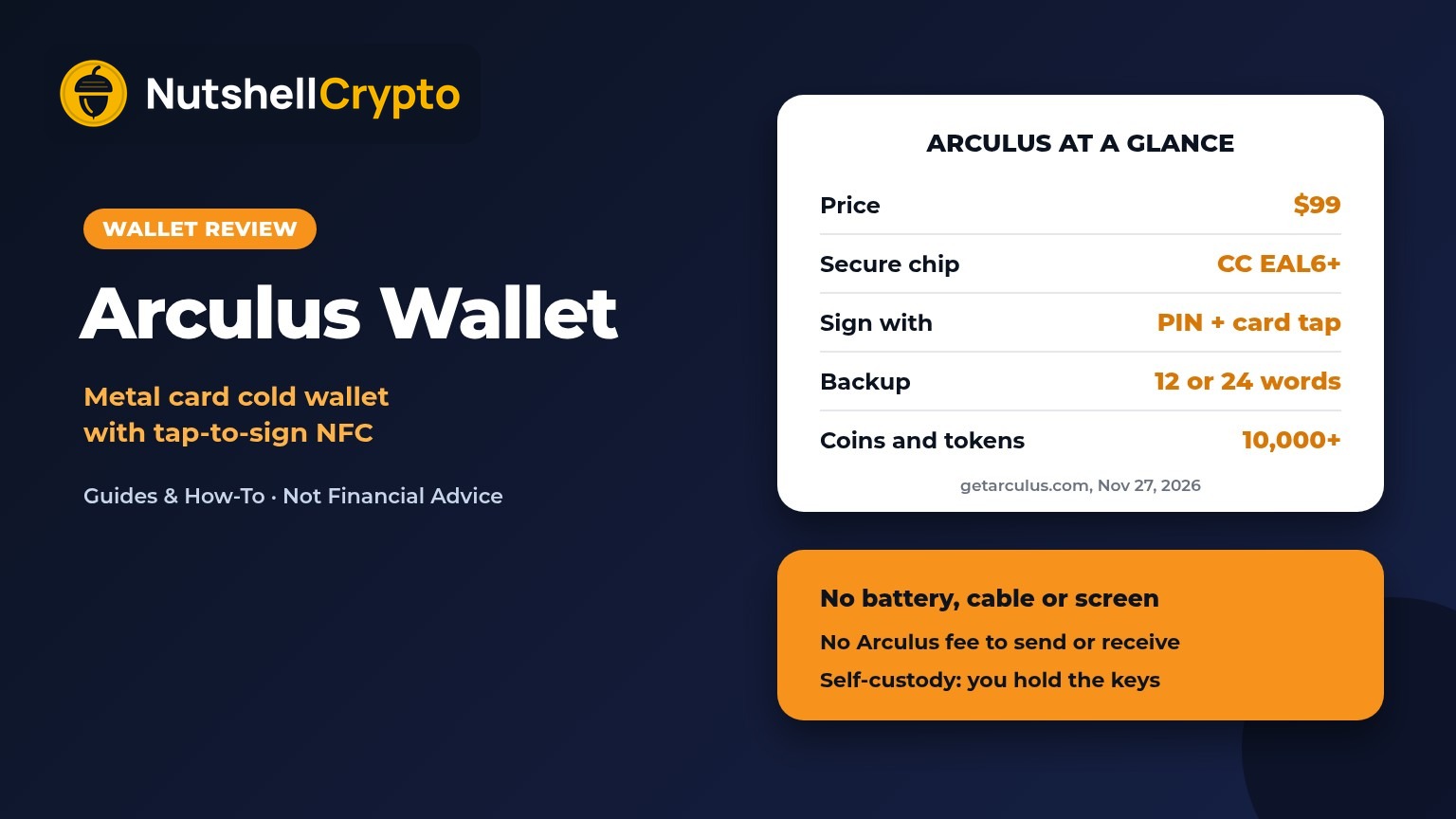
In a nutshell: Arculus is a cold wallet shaped like a metal credit card. Your private keys live on a secure chip inside the card, and you sign each transaction by entering a 6-digit PIN in the Arculus app and tapping the card on the back of your phone. It costs $99, has no battery, cable, Bluetooth or screen, and backs up with a standard 12 or 24-word recovery phrase. Arculus charges no fee to send or receive; buys, sells and swaps go through third-party partners who set their own fees. Educational only; not financial advice.
Arculus wallet is a self-custody cold storage wallet made of two parts: a metal NFC card that holds your keys and a free phone app where you see balances and approve transactions. It’s made by CompoSecure, a US company known for metal payment cards, and it aims at people who want hardware-wallet security without a gadget with buttons and cables.
This review covers how Arculus works, setup, supported coins, fees, staking, how safe it is, how it compares with Tangem, and short tax notes for the US, Canada and Australia. Prices, coin support and app ratings were checked on November 27, 2026, on Arculus’s own website, its support center and the app stores.
Table of contents
What Is the Arculus Wallet?
Arculus is a card-style hardware wallet. The Arculus Cold Storage Wallet product page describes a metal card with an NFC chip that stores your private keys, used together with the Arculus Wallet app on iPhone or Android. You can store, send, receive, buy and swap crypto, and view NFTs, from the app.
According to its About page, Arculus launched in 2021 and was developed by CompoSecure, which makes premium metal payment cards. The card is sold by Arculus Holdings, L.L.C., a Delaware company with offices in Somerset, New Jersey, according to the card’s terms of sale on the Arculus legal notices page. The bundle page says the cards are made in the USA.
Because you hold the keys, Arculus is a non-custodial wallet. Arculus can’t freeze your coins, but it also can’t recover them if you lose both the card and your recovery phrase. If that trade-off is new to you, read our guide to self-custody in crypto first.
How Arculus Works
Arculus calls its login “3-factor authentication.” The product page lists three things you need to move funds:
- Something you are: your face or fingerprint unlocks the Arculus app on your phone.
- Something you know: a 6-digit PIN starts a transaction.
- Something you have: you tap and hold the Arculus card to the back of your phone to sign and approve it.
The card has no battery and never needs charging. The Google Play listing says the card uses a CC EAL6+ certified secure element to store keys, and the Arculus FAQ says it talks to your phone over 13.56 MHz NFC, with a secure chip “similar to ones in banking cards and passports,” not a simple NFC tag.
The phone does the rest: it shows balances, builds transactions and connects to dApps. The FAQ also says one card holds one wallet, but you can add more cards to the same app if you want to split funds. Arculus keeps you offline in the sense that the keys never leave the card, but it is not fully air-gapped, since signing happens through your phone.
How to Set Up Arculus
Arculus’s Getting Started guide says setup takes about 6 minutes:
- Download the Arculus Wallet app from the App Store or Google Play. Only use the official listing; fake wallet apps are common.
- Place the card face down on a flat surface, line up your phone using the placement guide for your model, and tap Create a New Wallet.
- Create and confirm a 6-digit PIN, then tap the card to finish.
- Choose a 12 or 24-word recovery phrase and write it down on paper. Arculus says it is shown only once, and you should never screenshot it or store it on a device.
- Re-enter the words in the right order to confirm, then pick the coins you want on your dashboard.
To fund it, copy your receive address in the app and paste it into the exchange or wallet you’re sending from. Arculus’s send crypto guide notes that self-custody addresses don’t have an XRP destination tag or XLM memo, even if the sending platform asks for one. Our guide on how to transfer crypto to a cold wallet walks through test sends and network checks, and our seed phrase guide covers how to store the backup.
Supported Coins and Networks
Arculus’s coin support page says it supports over 95% of crypto assets by market capitalization, and that custom tokens on Ethereum, Polygon and BNB Smart Chain let you add any token on those chains, which is how it reaches more than 10,000 assets. Its homepage gives the figure as 10,000+ coins and tokens across 27 blockchains.
The list includes Bitcoin, Ethereum, XRP, Solana, Cardano, Dogecoin, Litecoin, Polkadot, Avalanche, Stellar, Tron, Toncoin, Hedera, Algorand, Aptos and stablecoins such as USDT, USDC and PYUSD. You can also connect to dApps through MetaMask or WalletConnect, according to the homepage.
One catch for second-hand buyers: Coin Bureau’s Arculus review reports that only cards on firmware 2.0 or later support the current coin list, and that early Edition Zero and Edition One cards sold before March 2023 don’t support most of today’s assets. Buy new from Arculus or an authorized seller.
Arculus Price and Fees
| Item | Cost (checked Nov 27, 2026) |
|---|---|
| Arculus card (Silver, Black or XRP edition) | $99 |
| Silver and Black 2-card bundle | $159 (list $198) |
| Arculus app | Free |
| Send or receive crypto | No Arculus fee; you pay the blockchain network fee |
| Buy, sell or swap in the app | Set by partners Onramper, Transak and Changelly, shown before you confirm |
The card price comes from the product page and the bundle price from the bundle page. When we checked, Arculus was also running a Black Friday and Cyber Monday deal through December 1: add any two cards and the second is free. Treat that as a short-term promotion.
The Arculus FAQ says Arculus does not charge fees to send or receive, and that buy, sell and swap fees are charged by its liquidity partners and displayed before you confirm. In-app buys support USD, AUD, CAD, EUR and GBP. Partner fees usually cost more than buying on a low-fee exchange and sending the coins to your card, so compare first; our crypto exchange fees guide explains spreads and card fees. Buying through a partner also means that partner’s ID checks. If you plan to buy in small amounts over time and move them to the card in batches, our crypto DCA calculator shows how regular buys add up.
The card comes with a two-year limited warranty on defects, according to the terms of sale.
Staking With Arculus
The FAQ says you can stake Cardano (ADA), Solana (SOL) and Cosmos (ATOM) in the app. Arculus’s staking guide describes three types: native staking (you pick a validator pool and keep the same token), liquid staking (you get a staked token back) and third-party staking (one pool chosen by the provider). Each stake is signed with your PIN and a card tap, and some coins have minimums or unbonding periods.
For the coin-specific details, see our guides to ADA staking, SOL staking and Cosmos staking, or the wider question of whether you can stake with a hardware wallet.
Is Arculus Safe? Strengths and Weak Points
Strengths:
- Keys are generated and kept on a certified secure element in the card, away from the internet.
- A thief needs the card, your PIN and access to your phone. The FAQ says a stolen phone or a stolen card alone can’t move your crypto.
- No battery, port or Bluetooth radio to fail or attack.
- The backup is a standard BIP39 12 or 24-word phrase, so Coin Bureau notes you can recover in other compatible wallets if derivation paths match.
- Arculus says it never stores your recovery phrase and will never ask you for it.
Weak points:
- No screen on the card. You check addresses and amounts on your phone, so malware on a phone could in theory show you one thing and ask you to sign another. Wallets with their own screen let you verify on the device.
- Phone dependent. No phone means no access until you set up the app again on another device.
- Not fully open source. Coin Bureau reports that WalletScrutiny can’t reproduce the current app from public source code. See our open-source crypto wallet guide for why that matters to some users.
- Limited Bitcoin tools. Coin Bureau lists no coin control, PSBT or Lightning support as drawbacks for advanced Bitcoin users.
- Recovery is on you. If you lose the card, you buy a new one and restore with your phrase. If you lose the phrase too, Arculus says it can’t help.
User ratings are strong: the US App Store listing showed 4.6 out of 5 from about 1,300 ratings when we checked. Ratings say the app is easy to use, not that it’s secure, so weigh them lightly. For a refresher on how card wallets differ from apps, see hot wallet vs cold wallet.
Arculus vs Tangem
Both are tap-to-sign NFC cards with no screen and no battery. The main difference is backup:
- Arculus always uses a 12 or 24-word recovery phrase, plus a PIN and your phone’s biometrics. One card costs $99.
- Tangem sells sets of two or three cards that act as backups of each other, and a seed phrase is optional. Our Tangem Wallet review lists the prices and setup options we checked.
If you like the familiar seed-phrase model and want a single metal card, Arculus fits. If you’d rather not write down words and are happy managing backup cards, Tangem is the closer match. Neither replaces good habits: test sends, checking addresses and keeping backups in separate places.
Tax Notes
United States: The IRS says digital assets are treated as property. Moving your own coins from an exchange to your Arculus card is not a sale, but selling, swapping in the app or spending crypto can create a capital gain or loss, and the IRS page lists staking rewards among the income you report. Keep the cost basis records from the exchange where you bought, because a self-custody wallet won’t send you a tax form. Our guide to taxes on crypto transfers and crypto staking taxes explain more.
Canada: The CRA’s page on crypto-assets and your tax obligations treats selling or trading crypto as a disposition that you must report as business income or capital gains. Sending coins between your own wallets is not a sale, but in-app swaps are. Keep CAD values for every swap and staking reward. See our cryptocurrency tax in Canada guide.
Australia: In-app buys support AUD. The ATO’s crypto asset investments page explains when capital gains tax applies to selling or swapping crypto and which records to keep.
FAQ
Is Arculus a safe wallet?
Arculus is a reasonably safe cold wallet for most people: keys stay on a CC EAL6+ secure element, and moving funds needs the card, a PIN and your unlocked phone. Its main limits are that the card has no screen to verify transactions and the software isn’t fully open source, per Coin Bureau’s review. Your recovery phrase is still the single biggest risk, so store it offline.
Which is better, Tangem or Arculus?
Neither is better for everyone. Arculus uses one $99 card plus a standard recovery phrase, while Tangem uses two or three backup cards and makes the seed phrase optional. Pick the backup model you’re most likely to manage correctly.
How do I transfer from Coinbase to my Arculus Wallet?
In the Arculus app, open the coin, tap Receive and copy the address. In Coinbase, choose Send crypto, paste the address, pick the same network your Arculus coin uses, preview and send, as Coinbase’s steps to send crypto describe. Coinbase warns that on-chain sends are irreversible, so send a small test amount first.
Is Arculus a decentralized wallet?
Arculus is a self-custody wallet: you hold the private keys on your card and the recovery phrase, and Arculus says it has no access to either. The app does rely on Arculus’s servers and third-party partners for balances, buying and swapping, but your coins live on the blockchain, not with Arculus.
Where is Arculus wallet made?
Arculus’s bundle page says the cards are made in the USA. The company behind it, CompoSecure, is a US metal card maker, and the seller is Arculus Holdings, L.L.C. in Somerset, New Jersey.
This article is for education only and isn’t financial or tax advice. Prices, supported coins and partner fees change; check Arculus’s site and the in-app quote before you buy.